Search HCAD property records, account numbers, tax bills, exemptions and protest tools
If you are searching a Harris County home, lot, business property, owner name or tax statement, start with the official HCAD record first. Confirm the 13-digit account number, then move to exemptions, iFile/iSettle, forms, corrections or the Harris County Tax Office only when that next step fits your task.
Harris County property research is easier when you separate the jobs. HCAD handles appraisal records, account lookup, property value, exemptions, forms, corrections and protests. The Harris County Tax Office handles tax statements, payments, receipts and electronic tax bill delivery.
This guide is built for a real user task: what link to open, what to type, what to check after the page loads, and when to stop before using the wrong record. It is especially useful for Houston-area homeowners, buyers, agents, business owners and property-tax protest research.
What do you need from Harris County property search?
Pick the task first so you do not waste time on the wrong office or tool.
Find a property record
Use HCAD Quick Search for account, address or owner-name lookup.
After opening: select the tax year, search, then verify account and owner.
Go to HCAD search stepsFix bad search results
Use HCAD search help when account, owner or address search fails.
After opening: follow account, partial-name and address input rules.
Go to search tricksCheck exemptions
Use HCAD exemption pages or forms for homestead, over-65, disability and related exemptions.
After opening: confirm documents and filing deadline.
Go to exemptionsFile a protest
Use HCAD iFile/iSettle when you disagree with value or need online protest help.
After opening: use your account number and iFile number from the notice.
Go to protest sectionPay property taxes
Use the Harris County Tax Office for statements, payments, receipts and electronic tax bills.
After opening: search by account, name or address, then confirm the record.
Go to tax payment helpCorrect name or address
Use HCAD forms when name, mailing address or property-address information needs correction.
After opening: choose the correct correction form and follow submission rules.
Go to correctionsHCAD vs Harris County Tax Office: use the right site
HCAD and the Tax Office are connected in the tax process, but they do different jobs.
Use for appraisal records, values and exemptions
Use HCAD for property records, account search, appraised value, market value, exemptions, forms, correction requests, business personal property and protest tools.
After opening: search the account first and save the 13-digit account number.
Use for tax statements, payments and receipts
Use the Harris County Tax Office when you need the amount due, tax statement, payment, receipt, e-bill registration or tax-office account support.
After opening: search by account, name or address and verify the property before paying.
Use for formal value disputes
Use HCAD iFile and iSettle when you disagree with the value and need to begin or manage a protest from home or office.
After opening: use the account number and iFile number shown on your notice.
How to search Harris County Appraisal District records by account, address or owner
The HCAD Quick Search page is the main user starting point. It allows account search, address search and owner-name search. Use this first before checking tax bills or filing a protest.
Open the official HCAD Quick Search
Use this page when you need official appraisal district data instead of copied third-party records.
After opening: choose Search By Account, Search By Address or Search By Owner Name.
Open official HCAD Quick Search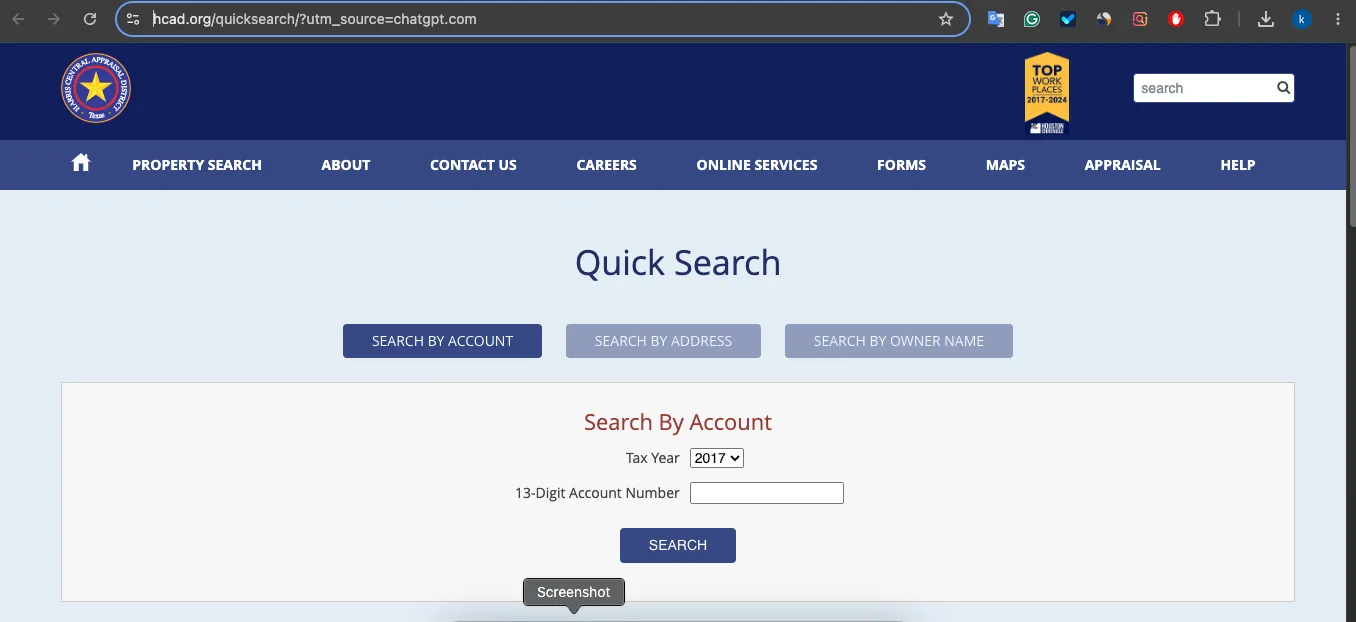
Use account search when you have the number
HCAD search help says real property account numbers have 13 digits and personal property account numbers have 7 digits.
After opening: enter the account number without hyphens or spaces.
Use address search carefully
HCAD says not to include words such as Drive, Street, Parkway or related abbreviations. It also says not to use periods and to use N, S, E or W instead of full direction words.
Example: try “1000 W 43rd” instead of “1000 West 43rd Street.”
Use owner-name search with simple input
Select the tax year and type all or the first part of the owner’s name. HCAD’s owner-name field asks for last name and first initial with no comma.
After opening a result: confirm account, address and owner before relying on the record.
HCAD search tricks when address, account or owner lookup fails
HCAD search does not always behave like Google Maps. Use official search-help rules before assuming the record is missing.
| Problem | Try this | Why it works |
|---|---|---|
| Account search fails | Remove hyphens and spaces. Use only digits. | HCAD search help says account numbers should not include hyphens or spaces. |
| Address search fails | Remove Street, Drive, Parkway, Road and similar words. | HCAD tells users not to include those words or abbreviations in address search. |
| Direction words fail | Use N, S, E or W instead of North, South, East or West. | HCAD specifically recommends the abbreviation format. |
| Owner name is hard to match | Use partial names or last name plus first initial. | Partial names can return names that start with the same letters. |
| Property has a zero address | Check the “Zeros” option or use range address search. | Some properties may have 0 street numbers in HCAD data. |
| Data looks outdated | Wait a few days, then contact HCAD if still wrong. | HCAD says data is usually refreshed nightly, but online records can temporarily differ. |
How to read an HCAD property record before using it
Do not use the first result blindly. Confirm the property before checking tax, exemption or protest information.
Market value, appraised value and taxable value in simple words
Many users search HCAD because the value or tax bill looks high. First separate HCAD’s appraisal record from the Tax Office bill.
Market value
The appraisal district’s opinion of what the property was worth on the valuation date. Start here if you think the record is too high.
Appraised value
The value used after limits or caps may apply. It can be lower than market value for some homestead properties.
Tax bill amount
The bill comes from the Tax Office after values, exemptions and local tax rates are applied. HCAD does not collect payment.
Harris County homestead exemption and HCAD forms
HCAD’s homeowner exemption page explains that exemptions remove part of a home’s value from taxation and lower taxes. HCAD’s forms page lists residential exemption forms, including the homestead exemption form for general residential, over-65, disability, over-55 surviving spouse and 100% disabled veteran homestead situations.
Before opening exemption forms, prepare this
HCAD iFile and iSettle: online property value protest help
HCAD explains that Texas law gives property owners the right to protest property value. iFile and iSettle are HCAD programs that help manage that appeal process online.
Find your notice details
Your value notice includes your account number and iFile number. HCAD says both are displayed in the upper-right portion of the notice.
After opening iFile: have both numbers ready before you start.
Open HCAD iFile and iSettle
Use this route when you want to file or manage a protest online.
Why use it: it is HCAD’s official online protest pathway, not a third-party appeal service.
Open iFile and iSettlePrepare evidence before submitting
Do not file a weak protest. Gather comparable sales, repair photos, condition details, wrong property characteristics, appraisal reports or exemption proof.
Evidence that can make a protest stronger
| Evidence | Supports | Practical step |
|---|---|---|
| Comparable sales | Market value argument. | Use similar homes near the valuation date. |
| Photos | Condition, damage or deferred maintenance. | Label each photo with what it proves. |
| Repair estimates | Cost to correct condition issues. | Keep itemised contractor estimates or invoices. |
| Wrong property data | Size, condition, use or feature errors. | Compare HCAD record with real property facts. |
| Exemption proof | Missing or denied exemption. | Prepare documents before contacting HCAD or protesting. |
Correct name, mailing address, property address or account data
HCAD’s forms page includes correction forms such as Request to Correct Name or Address on a Real Property Account and other correction-related forms. Use the right form instead of sending a vague email.
Compare the HCAD record first
Check account number, owner name, mailing address, property address, legal description and property characteristics.
Open HCAD All Forms
Use the correction section when the issue is name, address or property-account data.
After opening: look for the correction form that matches real property or business personal property.
Open HCAD All FormsFollow form instructions before mailing or delivering
HCAD form instructions explain that fillable forms may need Adobe Reader, and completed fillable forms must be printed, signed, and mailed or delivered when required.
Open HCAD Form InstructionsHarris County property tax statement search, payments and receipts
Use the Harris County Tax Office after you confirm the property through HCAD. The Tax Office search allows statement/payment and receipt lookup by account, name or address.
| Tax task | Use this official page | What to do after opening |
|---|---|---|
| View tax statement | Tax Statement Search and Payments | Search by account, name or address, then confirm the property. |
| Pay taxes online | Tax Office payment page | Review the amount due and payment method fee before paying. |
| Find receipt | Property Tax Receipt Search | Use receipt lookup and save a copy for your records. |
| Register for electronic tax bill | Electronic Tax Bill section | Read the legal notice carefully because paper bills may stop after registration. |
| Cannot pay full amount | Installment Payment Agreement information | Contact the Tax Office for current plan rules and eligibility. |
Why a Harris County tax statement may not appear online
The Harris County Tax Office lists several reasons a property tax statement may not be received by mail or visible online. It may be because HCAD has not certified the account, online display has been opted out, ownership changed, or the account is being reviewed before billing.
Check HCAD first
Confirm the account exists and the property record looks correct on HCAD.
Check Tax Office search again
Search by account, name and address. If one search type fails, try another.
Contact the correct office
If it is a value/account certification issue, start with HCAD. If it is a bill/payment/receipt issue, start with the Harris County Tax Office.
HCAD contact, office hours and map
Before calling HCAD, have the account number, owner name, property address, screenshot and short issue summary ready. This makes your question easier to route.
| Need help with | Best office | Prepare before contact |
|---|---|---|
| Property record or account search | HCAD | Account number, address, owner name and screenshot. |
| Exemption form or status | HCAD | Account number, residence proof and exemption form details. |
| Value protest | HCAD / ARB process | Notice, account number, iFile number and evidence. |
| Tax statement or receipt | Harris County Tax Office | Tax account, property address, tax year and payment details. |
Harris Central Appraisal District
13013 Northwest Freeway, Houston, Texas 77040-6305
HCAD call or email script
Use this helper before contacting HCAD or the Tax Office. A short, exact message usually gets better routing than a long unclear email.
Official Harris County HCAD and tax sources used in this guide
Use official pages for final action because portal screens, protest options, forms, tax bill access and fee details can change.
HCAD Home
Main Harris Central Appraisal District site for property search, online services, forms and taxpayer help.
After opening: choose Property Search, Online Services, Forms or Taxpayer Liaison based on your issue.
Open HCADHCAD Quick Search
Search by account, address or owner name.
After opening: select tax year and search method, then verify the account.
Open Quick SearchSearch Help
Official tips for account, address, owner and zero-address search issues.
After opening: follow formatting rules before assuming a record is missing.
Open Search HelpHCAD Forms
Use for homestead, corrections, renditions, protest and exemption forms.
After opening: jump to the correct category before downloading.
Open FormsHomeowner Exemptions
Use for homestead and other homeowner exemption guidance.
After opening: check eligibility, form name and deadline before applying.
Open Exemptions2026 Exemption Sessions
HCAD community assistance sessions for residential exemption help.
After opening: reserve an online or on-site timeslot if you need help.
Open SessionsiFile and iSettle
Official HCAD online protest pathway.
After opening: use your account number and iFile number from the notice.
Open Protest HelpTax Search / Payments
Use the Harris County Tax Office for statements, payments, receipts and e-bills.
After opening: search by account, name or address and verify before paying.
Open Tax SearchProperty Tax Info
Use for property tax payment information, receipts and electronic tax bill details.
After opening: review payment method fees and account requirements.
Open Tax InfoHarris County Appraisal District Property Search FAQs
How do I search Harris County Appraisal District property records online?
Open the official HCAD Quick Search page and search by account, address or owner name. Use the 13-digit account number for the most exact real property lookup when available.
What is the official Harris County Appraisal District property search website?
The official Harris County Appraisal District property search page is the HCAD Quick Search page at hcad.org/quicksearch. It supports account, address and owner-name searches.
How many digits are in a Harris County HCAD real property account number?
HCAD search help states that real property account numbers have 13 digits. When searching by account number, do not use hyphens or spaces.
Can I search HCAD records by address?
Yes. HCAD Quick Search allows address search. If the address search fails, remove suffixes such as Drive, Street or Parkway, avoid periods, and use short direction letters such as N, S, E or W.
Can I search Harris County property records by owner name?
Yes. HCAD Quick Search allows owner-name search. Select the tax year and type all or the first part of the owner name using the last name and first initial format when possible.
Where do I pay Harris County property taxes?
Harris County property tax payments are handled by the Harris County Tax Office, not HCAD. Use the Tax Office property tax statement search and payment page to view statements, pay taxes or find receipts.
Where do I file a Harris County property value protest?
HCAD provides iFile and iSettle for online protest handling. The notice you receive includes important numbers such as your account number and iFile number, which may be needed for online protest filing.
Where do I find Harris County homestead exemption forms?
Use HCAD’s All Forms page or Property Tax Exemptions for Homeowners page. The residential homestead exemption form is listed under the Residential Exemption section.
Why is my HCAD property record different from what I expected?
HCAD search help says data is usually refreshed nightly and records can differ from what appears online. If information remains incorrect after several days, use the proper account question or correction route.
What is the safest order to research a Harris County property?
Search HCAD first, confirm the account number and property record, check exemptions or protest options if needed, then use the Harris County Tax Office only for tax statements, payments and receipts.
Best way to use Harris County property search
The safest workflow is simple: search HCAD first, confirm the 13-digit account and property record, use HCAD forms or iFile/iSettle for exemption/protest/correction tasks, then use the Harris County Tax Office for tax statements, payments and receipts.